1. Purpose
Tell the AI what this file is for. Keep it plain: "draft a public notice", "prepare a grant question", "map my project", or "summarise a source trail".
Markdown is not magic. It is a simple way to give an AI agent a clean room to work in: what matters, what is private, what needs checking and what output would actually help.
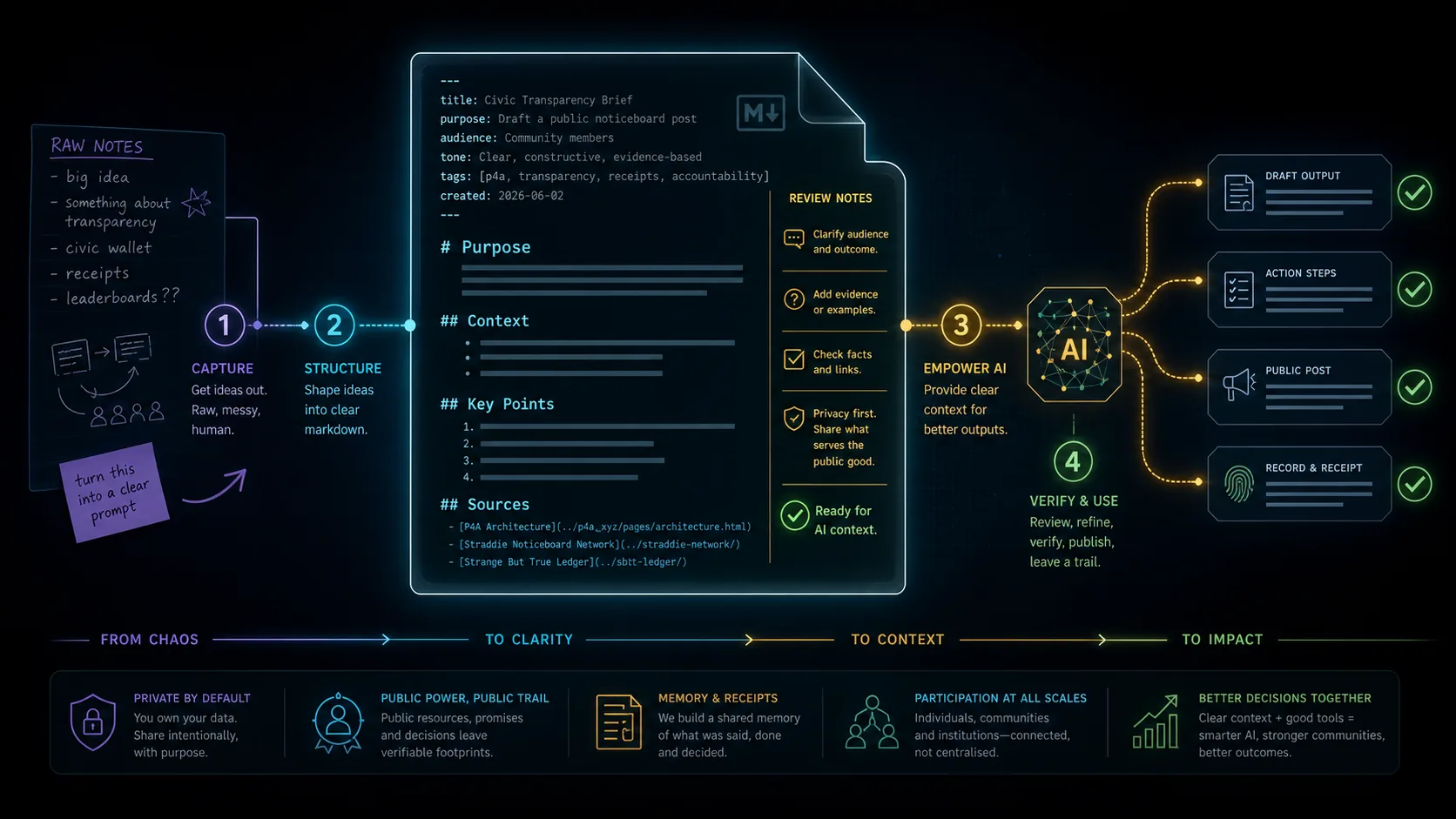
A strong AI-ready Markdown file usually does six simple jobs. First it names the purpose. Then it gives context. Then it draws privacy boundaries. Then it asks for a clear task. Then it provides source links. Finally it leaves room for review and correction.
Tell the AI what this file is for. Keep it plain: "draft a public notice", "prepare a grant question", "map my project", or "summarise a source trail".
Add the background that would save a human from asking the first five obvious questions.
Name what is public, private, trusted-only, draft, uncertain or not for publication.
Ask for one useful next action. A file can hold many notes, but the request should stay crisp.
Links, dates, file names, screenshots and quotes tell the AI what to check before it sounds confident.
Add questions, risks, corrections and human approval notes so the output can improve over time.
Modern AI tools increasingly use Markdown files as instructions, not just notes. `AGENTS.md` can tell a coding agent how to work inside a repo. `SKILL.md` can describe a reusable capability, examples, scripts and guardrails. The important lesson for beginners is simple: a Markdown file can become memory, instructions and workflow in one readable place.
That is why form-generated `.md` files matter. A form slows the thinking down just enough to ask better questions. The downloaded file then gives the AI structure it can reuse.
---
schema: public_noticeboard.v0
status: public_draft
visibility: public
use: "noticeboard, phone post, wall screen"
---

# Purpose
Turn the public facts below into a clear local notice.

## Public Facts
- Event: [public event name]
- Place: [public venue or meeting point]
- Date and time: [public date/time]
- Who it is for: neighbours, visitors and anyone interested
- Public contact: official event page

## Request For Artificial Intelligence
Offer three friendly versions:
1. Wall screen
2. Phone post
3. Plain-text message

Keep it plain, warm and useful. If a fact is missing or uncertain, leave a question for me to check.

## Source Links
- Official event page
- Venue update

## Questions To Check
- Is the date and time still correct?
- Is the venue update current?
- Is the public contact link the best one?

## Public Review Notes
- Work from the public facts and source links in this file.
- Keep claims modest and easy to verify.
- Leave final wording for the organiser to approve.Before you paste a `.md` file into AI, ask: